
GitLab Pages with Jekyll
Last updated on 2025-03-18 | Edit this page
Estimated time: 0 minutes
Jekyll is a powerful static site generator that may be behind GitLab Pages. It creates static HTML website content out of various files in your repository (Markdown files, CSS style sheets, page templates/layouts, etc.). This ‘compiled’ content is then served as your website.
Jekyll makes managing your website easier because it depends on templates. Templates (or layouts in Jekyll notation) are blueprints that can be reused by multiple pages. For example, we (your instructors) did not style each single exercise in this lesson separately: we created a template that specify how exercises should be shown (the orange box, the dropdown solution box etc.) and every time we tag a block of text as “Exercise” it is shown this way.
We will cover Jekyll layouts in a bit; for now let’s start learning Jekyll and its scripting language called Liquid.
Global Parameters
Also in this case, we will trigger and customise our deployment from
the .gitlab-ci.yml file. You can decide to edit your
previous version of the group-website repository, but we
suggest to create a new one. Follow the steps in “Setting up a project”
in the introduction
if you want to do so. Create/change the .gitlab-ci.yml file
content with:
image: ruby:latest

pages:
  script:
    - gem install bundler
    - bundle install
    - bundle exec jekyll build -d public
  artifacts:
    paths:
      - public
  only:
    - main
{: .language-yaml }
This code requires the script to run on the environment of the latest Ruby version, installs the Jekyll gem, and builds the site to the public path (creating the folder remotely, you should not worry about it at this point). The result affects only the main branch.
The execution of this pipeline also requires a Gemfile.
Create it in the root folder with the following content: ~~~ source “https://rubygems.org”
gem “jekyll” ~~~ {: .language-shell }
In brief, but we will look into it in more detail, Jekyll looks for text files that begin with a header formatted like this:
---
variable: value
other_variable: other_value
---

...stuff in the page...
{: .source}
and inserts the values of those variables into the page when formatting it. The three dashes that start the header must be the first three characters in the file: even a single space before them will make Jekyll ignore the file.
The header’s content must be formatted as YAML, and may contain
Booleans, numbers, character strings, lists, and dictionaries of
name/value pairs. Values from the header are referred to in the page as
page.variable. For example, this page:
---
name: Science
---
{% raw %}Today we are going to study {{page.name}}.{% endraw %}
{: .source}
is translated into:
<html>
  <body>
    <p>Today we are going to study Science.</p>
  </body>
</html>
{: .html}
Exercise: Jekyll’s syntax
Test your understanding of Jekyll’s syntax. What would this template will be translated into? ~~~ — name: Tom location: Heidelberg — {% raw %}{{page.name}} is in {{page.location}}. I believe {{page.location}} is a very nice city.{% endraw %} ~~~ {: .source}
Solution
<html>
  <body>
    <p>Tom is in Heidelberg. I believe Heidelberg us a very nice city.</p>
  </body>
</html>
{: .html}
{: .solution } {: .challenge }
Jekyll’s main configuration options are specified however in another
file, called _config.yml. Let’s create some configuration
parameters for our website.
- Create a
_config.ymlfile in your site’s root directory. - Add parameters
descriptionandemailto it as:
description: This project develops training materials for reseachers wanting to learn to build project
websites in GitLab Pages.
email: team@carpentries.org
{: .language-yaml}
Global configuration settings from _config.yml are made
available as site.PARAMETER_NAME variable in every page
within the website. So, global parameter email we defined
above would be accessed as site.email. Please note: this
are global paramenters, hence different from the local page-specific
parameters in the examples above.
In order to access the parameter’s value within a page, you use
Liquid’s notation to output content by surrounding a variable in curly
braces as {% raw %}{{ variable }}{% endraw %}.
Predefined Global Parameters
In addition to the global parameters you define, Jekyll also makes a number of useful predefined site-wide variables available to you within your website: e.g.
{% raw %}{{ site.time }}{% endraw %}(the current time) or{% raw %}{{ site.pages }}{% endraw %}(a list of all pages). {: .callout}
Create a index.md file in the root folder, with the
following content:
{% raw %}---
title: My first Jekyll page
---{% endraw %}

# Building Websites with Jekyll and GitLab

## Description
{% raw %}{{ site.description }}{% endraw %}
Welcome to {% raw %}{{ page.title }}{% endraw %}

Have any questions about what we do? [We'd love to hear from you!]({% raw %}mailto:{{ site.email }}{% endraw %})
{: .language-markdown }
Your project should include the following files:
 {:
.image-with-shadow width=“600px” }
{:
.image-with-shadow width=“600px” }
Commit and push your changes, then monitor the pipeline execution and
check the final result at your
https://<your user name>.embl-community.io/group-website
URL.
Exercise: Create a Global Twitter Parameter
In
about.mdwe have a Twitter URL under the ‘Contact us’ section. That’s one piece of information that could go into global parameters in_config.ymlas you may want to repeat it on a footer of every page. Make changes to your website to extract Twitter URL as a global parameter. > ## Solution > 1. Add parameter twitter to_config.yml: > ~~~ > description: “This research project develops training materials for reseachers wanting to learn to build project > websites in GitHub with GitHub Pages.” > email: “team@carpentries.org” > twitter: “https://twitter.com/thecarpentries” > ~~~ > {: .language-yaml} > > 2. Make use of the twitter parameter inabout.md: > > ~~~ > # About > > ## Project > > {% raw %}{{ site.description }}{% endraw %} > > ## Funders > > We gratefully acknowledge funding from the XYZ Founding Council, under grant number ‘abc’. > > ## Cite us > > You can cite the project as: > > > The Carpentries 2019 Annual Report. Zenodo. https://doi.org/10.5281/zenodo.3840372 > > ## Contact us > > - Email: {% raw %}{{ site.email }}{% endraw %} > - Twitter: {% raw %}{{ site.twitter }}{% endraw %} > ~~~ > {: .language-markdown } > > 3. Note that you should not see any changes to your website really. However, you can now access your Twitter URL from > any website page, should you need to. > {: .solution} {: .challenge}
Local Parameters
In addition to global (site-wide) parameters available via the
site global variable, Jekyll makes local
(page-specific) information available to you via the page
variable. Some of these are pre-defined - like page.title,
which gives you the title of the page that is currently active/being
visited. Others you can define yourself. Check this list of
predefined page parameters.
You can define local parameters using YAML notation within a Markdown
page by including it in a page header and delimiting the header with
triple-dashed lines ---. These headers are called front
matter and are used to set variables and metadata on individual
pages in your Jekyll site.
Front matter
From Jekyll’s website:
Any file that contains a YAML front matter block will be processed by Jekyll as a special file. The front matter must be the first thing in the file and must take the form of valid YAML set between triple-dashed lines. {: .callout}
Global and Local Parameters Are Case Sensitive
It is important to note that the parameters used in the sites are case sensitive. By convention, usually they are all lowercase characters. {: .callout}
Here is an example:
---
layout: post
title: "My first blog post"
author: "Danger Mouse"
---
{: .language-yaml }
Between these triple-dashed lines, you can overwrite predefined
variables (like page.layout or page.title) or
create custom ones you need locally on the page (like
page.author). These variables will then be available for
you to access using Liquid’s tags
(e.g. {% raw %}{{{% endraw %} page.title {% raw %}}}{% endraw %}
) further down in the file and also in any files that include this one.
Note that these variables are only accessible on that page. You will get
an error if you try to reference a page.variable that was
defined on a different page.
Exercise: Practice With Local Variables
Let’s practice making and using local variables. Think of a local variable you may want to use only in your
about.mdorindex.mdpage. If you cannot think of any, create a local variable called ‘lesson-example’ with the value of ‘https://carpentries.github.io/lesson-example/’ and reference it in yourindex.md.What did you add to your
index.mdto create this variable? Where did you add the front matter in yourindex.md? How did you reference that variable?Solution
Create a YAML header at the very top of
index.mdand add thelesson-examplevariable in between the triple-dash delimiters. You can then reference the value within yourindex.mdpage as{% raw %}{{{% endraw %} page.lesson-example {% raw %}}}{% endraw %}. Your file should now look like:--- lesson-example: "https://carpentries.github.io/lesson-example/" --- # Building Websites in GitHub ## Description {% raw %}{{ site.description }}{% endraw %} More details about the project are available from the [About page](about). See some [examples of our work]({% raw %}{{{% endraw %} page.lesson-example {% raw %}}}{% endraw %}). Have any questions about what we do? [We'd love to hear from you!]({% raw %}mailto:{{ site.email }}{% endraw %}){: .language-markdown }
Note that this variable is not accessible from
about.mdpage and is local toindex.md. {: .solution} {: .challenge}
Adding new pages
The next step will be to create another page of this website.
Ideally, our website will have multiple pages and therefore, to keep
things in order, we will create the pages folder to store
them. In this folder, create an about.md file with the
following content:
{% raw %}---
title: About
permalink: /about/
---{% endraw %}

# About

## Project

{% raw %}{{ site.description }}{% endraw %}

## Funders

We gratefully acknowledge funding from the XYZ Founding Council, under grant number 'abc'.

## Cite us

You can cite the project as:

>    *The Carpentries 2019 Annual Report. Zenodo. https://doi.org/10.5281/zenodo.3840372*

## Contact us

- Email: [{% raw %}{{ site.email }}{% endraw %}](mailto:{% raw %}{{ site.email }}{% endraw %})
- Twitter: [@thecarpentries](https://twitter.com/thecarpentries)
{: .language-markdown }
Note that the URL location of this page is specified in the header,
through the permalink attribute.
This is the current aspect of your folders:
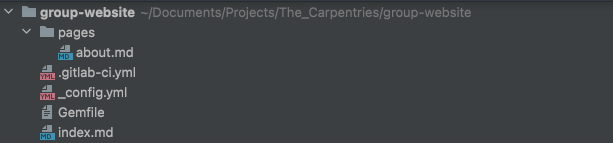 {:
.image-with-shadow width=“600px” }
{:
.image-with-shadow width=“600px” }
Now, we should edit the index.md file to include a link
to this new about page, in order to be able to reach it from the main
page. Add a line the index.md to include:
More details about the project are available from the [About page](about).{: .language-markdown }
The link in this line will redirect to
https://<your user name>.embl-community.io/group-website/about,
that is the URL of our new about page.
Commit, push and go to your website to see the changes. Note that
site parameters will not render nicely when viewing files in GitHub
(they will be displayed as text
{% raw %}{{ site.PARAMETER_NAME }}{% endraw %} rather than
the parameter’s rendered value) but will in the website.
Reuse and Reduce
Jekyll’s global parameters are a useful way to keep all your site-wide configuration in a single place (even if you only use them once). In combination with Jekyll layouts/templates (to be covered in the next episode) they are a great way of creating reusable markup snippets that can be repeated on multiple or even on every page of your website. Reuse helps you reduce the amount of code you have to write. {: .callout}
Useful links
This was just meant to be a very basic tutorial. The possibility of sites customisation with Jekyll go far beyond what shown here, you could for example:
- design page layouts (such as the exercises/solutions in this lesson),
- work with loops to process variables containing multiple values iteratively,
- use filters to control the format of variables when inserted in a page,
and more. This lesson from The Carpentries, even if designed for GitHub, is a valuable resource to learn more about how to do so.
If you are looking for the official GitLab documentation about GitLab Pages with Jekyll, follow this link.
Finally, this project contains a more elaborated template of a GitLab and Jekyll based website.
{% include links.md %}